I Like This Idea – Community Knowledge Consolidator

I really like the direction of turning BeeAIGenModelWalker into a Community Knowledge Consolidator. The core value for me is being able to anonymously share how we navigate and extract business logic from CA Gen / Bee Gen models — without ever exposing the actual models or sensitive business content.

What I find especially promising:

  • Sharing generic perspective profiles (GUI-focused, Business Rules-focused, etc.)
  • Exchanging best filter configurations and navigation patterns
  • Collecting anonymized insights on what properties and associations best reveal business logic
  • Building collective knowledge that can benefit both the community and specialized AI tools

This approach respects confidentiality while allowing us to learn from each other’s experience. Everyone can benefit from the combined wisdom without compromising their own intellectual property. I believe this could become one of the most valuable features of the project.If others also like this idea, I’m happy to help define the contribution process, templates, or guidelines for safe & useful anonymous sharing.

What do you think?

publ@jgen.eu

Interest in Building a Community Knowledge Consolidator

When exploring large Bee Gen / CA Gen models, different people naturally focus on different areas — some on GUI and user experience, others on business rules, data, or server-side logic.While individual exploration is valuable, we lose a lot by not combining these perspectives into shared understanding.I am considering extending BeeAIGenModelWalker into a Community Knowledge Consolidator with:

  • Perspective-based filters (GUI Focus, Business Rules Focus, etc.)
  • Shared annotations and tags on model objects
  • Easy cross-references between GUI and business rules
  • Clean, role-specific living documentation (Markdown + HTML)

The goal is to turn personal model exploration into collective intelligence for the whole team and community.If you’re interested in this direction, have use cases, or would like to contribute ideas — please comment below.Feedback welcome!

publ@jgen.eu

Progress Update: Development of Meta-Meta Model Walking Utility with Advanced Filtering

A configurable meta-meta walking and filtering utility is under active development as an extension to the BeeAIGenModelWalker project. The objective is to enable users to extract a clean, business-focused view of the meta-meta model by filtering out technical, internal, and non-relevant elements according to configurable preferences.

Achievements

  • Robust Foundation: The existing model walker provides a solid and scalable base for traversing complex CA Gen / Bee Gen structures.
  • Advanced Filtering Layer: A flexible, configuration-driven filtering engine has been designed and prototyped. Filters are defined externally (JSON), allowing users to specify object types, property inclusion/exclusion rules, and business relevance criteria without modifying source code.
  • Clear Separation of Concerns: Instance-level (meta-model) walking has been kept distinct from schema-level (meta-meta) filtering, improving maintainability and performance.
  • Human-Readable Output: Reliable generation of structured Markdown reports has been implemented, with successful conversion to single-file HTML documents featuring professional formatting, tables, and collapsible sections for improved readability.
  • Significant Noise Reduction: Early application of filters substantially reduces output volume while preserving core business objects, properties, and relationships.

Challenges Encountered

  • Meta-Meta Complexity: Navigation of associations, property inheritance, and dynamic typing in the meta-meta layer has proven more intricate than instance traversal, requiring additional refinement.
  • Configuration Calibration: Achieving an optimal balance in filtering rules remains an iterative process. Over-filtering can omit relevant elements, while under-filtering retains excessive technical detail.
  • Metadata Quality: Many meta-meta definitions contain limited or missing descriptions, which impacts the richness of automatically generated documentation. Mitigation strategies, including fallback mechanisms and annotation support, have been introduced.
  • Visualization: Automated generation of diagrams from the filtered model (e.g., Mermaid or PlantUML) is still in the planning stage.

Current Status and Next Steps

The core MetaMetaBusinessFilter and reporting modules are now functional in a development branch. Users can load meta-meta structures, apply custom filters, and produce focused business-oriented documentation in Markdown or self-contained HTML format.Planned short-term enhancements include:

  • Improved command-line and configuration interface for easier customization.
  • Enhanced relationship cardinality handling and description enrichment.
  • Integration of diagram generation capabilities.
  • Full documentation and merge into the main repository.

This extension aims to transform the BeeAIGenModelWalker into a professional analysis and documentation tool suitable for architects, business analysts, and development teams working with CA Gen / Bee Gen models.

Project repository: https://github.com/JGen-Notes/BeeAIGenModelWalker

Feedback from the community on requirements, configuration examples, or additional use cases would be highly valuable.

publ@jgen.eu

CA Gen Open Meta Project – Coming Soon

I have successfully built a utility that extracts and processes the meta-model from odrpta.chm (CA Gen Object Repository / Public Interface).The tool is now running stably and can generate structured Markdown and JSON outputs. However, as expected with such a complex meta-meta model, the current output still needs refinement — especially regarding:

  • Proper handling of property inheritance from higher-level objects
  • Clear visualization of associations and relationships
  • Better filtering of business-relevant vs technical/obsolete elements

Next Steps

I will soon make the repository public on GitHub. The project will include:

  • Extraction tools (Java)
  • Cleaned Markdown documentation
  • Structured JSON representations
  • Focus on business-relevant parts of the CA Gen meta-model

This will be an open and collaborative effort. I welcome contributions and feedback from the community — especially help in identifying what is truly business relevant versus tool-specific or obsolete. If you have experience with CA Gen modeling, Action Blocks, or meta-models and would like to contribute ideas, feel free to reach out once the repository is public.Stay tuned — the repository will be opened in the coming days.

publ@jgen.eu

Opening the CA Gen Meta-Model (odrpta.chm)

I am working on extracting and cleaning the CA Gen Object Repository / Public Interface documentation from odrpta.chm. This meta-model contains rich business-relevant information — including Entity Types, Attributes, Relationships, Subject Areas, Functions, Processes, Action Blocks, and more.The original documentation is quite noisy and contains many low-level, internal, and obsolete details. The goal is to filter it down to the meaningful business concepts, making it much more usable for humans and AI systems.

Status: Extraction and filtering is nearly complete. The cleaned version (Markdown + JSON) will be published soon on GitHub as an open-source project. It will be designed to be easily extended in the future.

Modernizing CA Gen Applications with AI – A Practical First Step

Many enterprises continue to rely on CA Gen for their core business systems. While these systems are reliable, finding skilled CA Gen developers is becoming harder and more expensive. At the same time, businesses want faster innovation and modern technology stacks.We conducted a small but meaningful experiment using the standard GEN SAMPLE MODEL:What we did:

  • Took one existing process (ADD_DEPARTMENT) including its entity definitions
  • Used AI to automatically generate a complete modern Java version

Business Benefits Observed:

  • Dramatic reduction in effort: What traditionally takes days or weeks of manual rewriting was completed in hours.
  • Preservation of business logic: All core rules, validations, and behaviors from the original CA Gen action block were maintained.
  • Modern technology stack: The result is a clean Spring Boot + JPA application ready for cloud, containers, and modern DevOps practices.
  • Lower future maintenance cost: Java developers are far more available and affordable than specialized CA Gen resources.
  • Reduced risk: Business rules stay consistent during modernization.
  • High reusability: The same approach can be applied to other action blocks and entities.

This exercise proves that AI can act as a powerful accelerator for CA Gen modernization — not by replacing developers, but by multiplying their productivity.

Next Phases Planned:

  1. Done — Automated translation of existing logic (completed)
  2. Next — Using AI to efficiently apply changes to existing models
  3. Following — Migrating selected components between different CA Gen models

From CA Gen Action Blocks to Clean Spring Boot Code in MinutesAI-Assisted Modernization – Real Example from GEN SAMPLE MODEL 8 6

As part of exploring AI tools to support CA Gen modernization, I extracted the Entity Type Definitions and the ADD_DEPARTMENT action block from the standard sample model and asked an AI to generate a modern Java equivalent.

CA Gen Action Block (Original)

as a text

+- ADD_DEPARTMENT
    IMPORTS: input division, input employee, import department
    EXPORTS: output employee

   +- READ required division WHERE number = input division number
   +- WHEN not found → EXIT STATE division_nf

   +- CREATE new department
   |   SET name, number
   |   ASSOCIATE with required division
   +- WHEN already exists → EXIT STATE department_ae

   +- IF input employee number != 0
   |   +- READ required employee
   |   +- WHEN successful
   |   |   ASSOCIATE employee WITH new department (is_managed_by)
   |   |   MOVE TO output employee
   |   +- WHEN not found → EXIT STATE employee_nf_dept

Modern Java Equivalent (Spring Boot 3 + JPA + Lombok)Key Entity

as a java

@Entity
@Table(name = "DEPARTMENT")
public class Department {
    @Id
    @Column(name = "NUMBER", length = 20)
    private String number;

    private String name;

    @ManyToOne(fetch = FetchType.LAZY)
    @JoinColumn(name = "DIVISION_NUMBER", nullable = false)
    private Division division;

    @ManyToOne(fetch = FetchType.LAZY)
    @JoinColumn(name = "MANAGER_EMPLOYEE_NUMBER")
    private Employee manager;
}

Service Method (Core Logic)

as a java

@Transactional
public AddDepartmentResponse addDepartment(AddDepartmentRequest request) {

    Division division = divisionRepository.findById(request.getDivision().getNumber())
            .orElseThrow(() -> new ExitStateException("division_nf", "Division not found"));

    Department department = Department.builder()
            .number(request.getDepartment().getNumber())
            .name(request.getDepartment().getName())
            .division(division)
            .build();

    try {
        department = departmentRepository.save(department);
    } catch (Exception e) {
        if (e.getMessage().contains("Duplicate")) {
            throw new ExitStateException("department_ae", "Department already exists");
        }
    }

    if (isValidEmployeeNumber(request.getEmployee().getNumber())) {
        Employee employee = employeeRepository.findById(request.getEmployee().getNumber())
                .orElseThrow(() -> new ExitStateException("employee_nf_dept", "Employee not found"));

        department.setManager(employee);
        employee.setDepartment(department);
    }

    return buildResponse(department);
}

Results: 

  • High fidelity mapping of Gen concepts (Entity Views, READ/CREATE/ASSOCIATE, Exit States)
  • Proper JPA relationship handling
  • Clean, testable, maintainable code using current Java standards (Java 21, Spring Boot 3)

This demonstrates that AI can understand CA Gen semantics surprisingly well.

Project: User-Added Function Implemented by Action Block (Part2)

I mentioned about launching a new incubator project. The primary goal was to build a tool helping in the development of so-called user-added functions for the CA Gen. It was couple weeks ago. The first experimental version of the Eclipse project delivering such tool you can find here published on the GitHub for the public viewing. You will be able to download the standalone UAF utility from here. I would like to remain you that all software downloaded from this website is experimental and you should not use it in the production environment until tested adequately.

This post provides a detailed information how to install and use the UAF utility by creating a simple user-added function in the CA Gen Model, later referred to as a function.

Installing software

Step 1. Download and expand zip file

The utility consists of the executable jar file and directory with the number of jar files required to run the UAF utility. Your installation directory will look as follows.

Step 2. Copying CA Gen jar files

The utility is using a number CA Gen jar files which you can find in the CA Gen installation directory. You need to copy them into the subdirectoryuad_lib. They are:

com.ca.gen.jmmi_8.5.0.00333.jar, abrt.jar, csu.jar, odc.jar, vwrt.jar

Above jar files containing JMMI API allowing access a CA Gen model located on the workstation and some runtime classes allowing run mockup software required to do unit-testing of your newly developed functions.

Step 3. Starting utility

You need to run the utility from the command line. Here is how to display help information.

Utility  User-Added Function (UAF), Version 0.5
Usage:  java  -jar uaf.jar  modelpath cagenpath [ -forceall | -testonly  | -sourcesonly]
     where:
        -forceall   force clean up entire generation frastructure
        -testonly   generate test classes only
        -sourcesonly   regenerate implementation classes only

You will learn more about parameters and options later.

Defining user-added function

We are going to use the CA Gen Toolset to develop a library of functions. This is very easy and straightforward process.

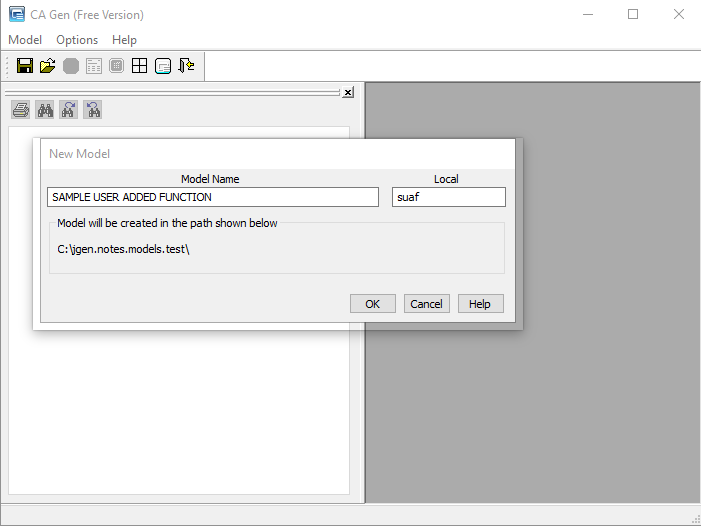
Step 1. Create a new CA Gen model

Best practice is to start creating a new dedicated empty model and use it to define all functions in your library. Additionally, you can use such model later to implement some of your functions using some purpose written action blocks created in this model.
Step 2. Set environment for generation

You will notice that your model has one Business System having a name like your model. Select Environment under Construction and select our business system by double-clicking on the name. You will see the following window pane opens allowing set some properties for the selected business system.
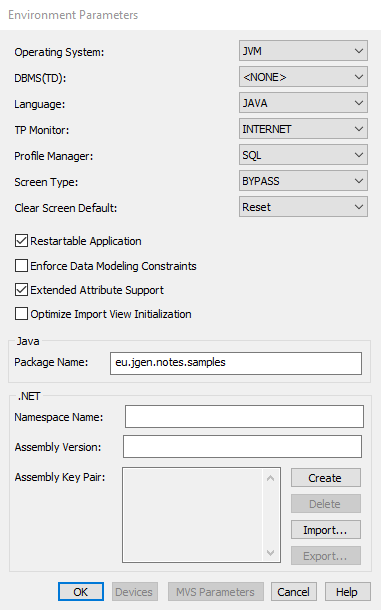
The utility can generate only for the Java environment at present. Therefore, be sure that selected operating system is JVM, language is  Java and you set correct name for the package.

Step 3. Create action block

You are defining a function by creating your action block. Not all action block can serve as a template. Qualifying action block should have some attribute views defined in the import section and single attribute in the export section.

We are going to create a rather simple function first whose whole purpose will be to add two numbers and return a sum of them as a result. We expect that our new function will take two parameters of type number and return a single number.

 
Model : TSTUAF1                                       10 Sept. 2017  22:24
Subset: (complete model)                                         
                                                                           
                          BSD Action Block:  FAB01
___________________________________________________________________________

Action Block Description:
#meta {
import eu.jgen.notes.uaf.proc.Function;
@Function (CGName="XFAB01", useselec=false, impl=true)
// Adds two numbers and returns sum of those numbers.
}

 +- FAB01
 |    IMPORTS: 
 |      Work View   imp1 ief_supplied (optional,transient,import only)
 |        count (optional)
 |      Work View   imp2 ief_supplied (mandatory,transient,import only)
 |        count (mandatory)
 |    EXPORTS: 
 |      Work View   exp ief_supplied (transient,export only)
 |        count 
 |    LOCALS: 
 |    ENTITY ACTIONS: 
 |  
 |  USE ab02
 |      WHICH IMPORTS: Work View   imp1 ief_supplied  TO Work View   imp1 ief_supplied 
 |                     Work View   imp2 ief_supplied  TO Work View   imp2 ief_supplied 
 |      WHICH EXPORTS: Work View   exp ief_supplied  FROM Work View   exp ief_supplied 
 +--

The above action block qualifies as a template for the function and we will use it to create such function. Also, please notice that action block has one statement. The statement is USE statement and invokes another action block. This is an unnecessary complication, but it demonstrates that function’s implementation can invoke a number other action blocks if necessary.

 
Model : TSTUAF1                                       10 Sept. 2017  22:28
Subset: (complete model)                                         
                                                                           
                           BSD Action Block:  AB03
___________________________________________________________________________

Action Block Description:

 +- AB03
 |    IMPORTS: 
 |      Work View   imp1 ief_supplied (optional,transient,import only)
 |        count (optional)
 |      Work View   imp2 ief_supplied (mandatory,transient,import only)
 |        count (mandatory)
 |    EXPORTS: 
 |      Work View   exp ief_supplied (transient,export only)
 |        count 
 |    LOCALS: 
 |      Work View   loc ief_supplied 
 |        command 
 |    ENTITY ACTIONS: 
 |  
 |  SET exp ief_supplied count TO imp1 ief_supplied count + imp2 ief_supplied count 
 +--

The statement in the last invoked action block has our implementation logic and simply adds two numbers. On this occasion, we are going to use newly created action block to implement the logic of our function as well. Please notice that only first action block has the annotation.

Step 4. Annotate action block

We are using Java style annotations to mark action block as a template creating function. You find the following annotation added to the description of our action block.
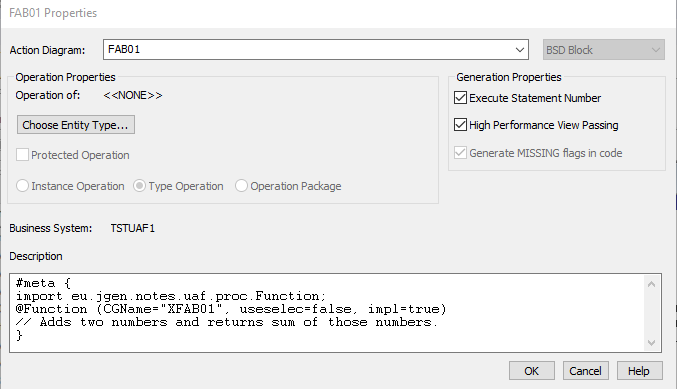
 

The @Funtionannotation allows providing additional information required for creating a function in the CA Gen model. The CGName parameter specifies the generated function internal name. It should be unique among already existing functions including those provided by the CA Gen. The useselecparameter indicates whether the function will take part in a database SELECT statement as selection criteria. The parameterimpl indicates whether the action block should be used as implementation. You may decide to implement function entirely outside of the CA Gen or only partially using also dedicated action blocks.

This step completes a process of defining the function. Rest of processing is generating artifacts using our UAF utility.

Step 5. Running utility

You will need Java 1.8 to run, but you can regenerate project with another version of Java. Version 1.7 should be fine. Utility takes two parameters. The first parameter points to the location of the CA Gen model with templates created in the previous step. The second parameter points to the location of the CA Gen itself. Here is sample output produced when running the utility.

Utility  User-Added Function (UAF), Version 0.5
Starting...
Connected to local model: TSTUAF1
WARNING: All subdirectories were forced to be emptied.
INFO: Adding subdirectory. 
INFO: Adding java functions subdirectory. 
INFO: Adding meta-inf subdirectory. 
INFO: Generation directory used: C:\jgen.notes.models.test\tstuaf1.ief\notes
INFO: Project file with Java nature created. 
INFO: Classpath file with CA Gen libraries created. 
INFO: Found 1 function(s).
INFO: XML file for 1 function(s) created.
INFO: Creating  package sub-directories for functions: C:\jgen.notes.models.test\tstuaf1.ief\notes\src\com\ca\gen\abrt\functions
INFO: Function com.ca.gen.abrt.functions.XFAB01 generated.
INFO: Creating  package sub-directories for functions: C:\jgen.notes.models.test\tstuaf1.ief\notes\src\com\ca\gen\abrt\functions\test
INFO: Function Test Classcom.ca.gen.abrt.functions.XFAB01Tests generated.
WARNING: Test class was regenerated. All previous modifications were lost.
INFO: Implementation action block AB03 generated.
INFO: Implementation action block AB02 generated.
INFO: Implementation action block FAB01 generated.
INFO: MANIFEST.MF file created. 
Processing completed.

Utility produces some messages as progress thru the generation process. The utility does not modify your model and is accessing model in the read-only mode.

Step 5. Reviewing generated artifacts

You will find that your local model directory’s structure has changed and you have a new subdirectory notes and its internal structure is as follows.
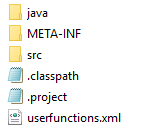
The utility creates Eclipse plug-in project structure that you can import into the Eclipse as a new project. The project has Java nature, and all Java artifacts will be compiled as soon import completes.

Step 6. Import project into Eclipse

You need to start Import wizard, select Existing Projects into Workspace and press Next.
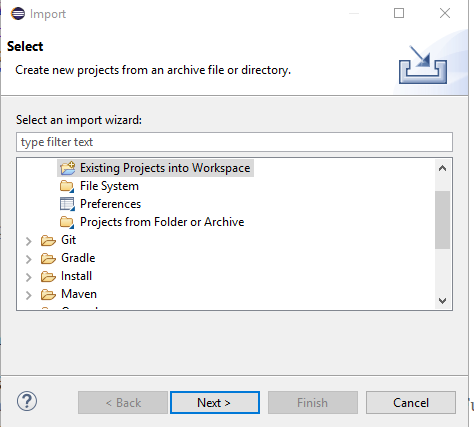
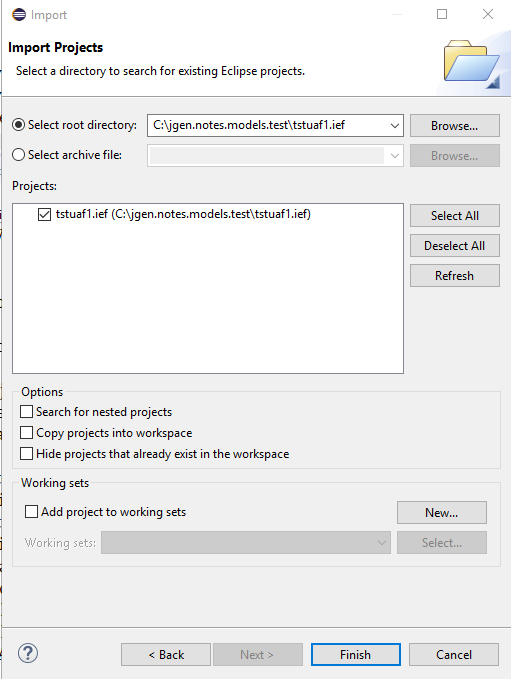
You need select root directory and our new project will show up on the list of projects. Select project and press Finish.
 

You will notice that you have a new project in your workspace. The project is instantly built.  You can expand folders to see what has been generated for you.
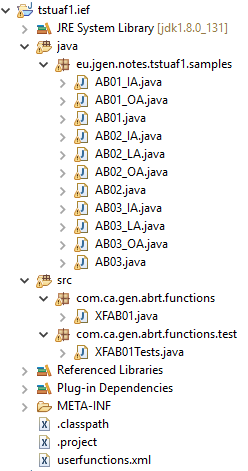
 

Starting from the top, the folderjava has sources of all action blocks marked by annotation and all other action blocks that may be used by the annotated action block. Next, the foldersrc contains the source of the function and testing harness for the unit testing. On the bottom, you will find XML userfunctions.xmlfile with the definition of the function. The CA Gen Toolset will use this file to create the function inside the CA Gen model.

Testing user-added function

Your functions can be relatively straightforward and tested easily, but in some cases, you will need to ensure a proper test cycle. This includes unit test done in a separation of other software components. The UAF utility can help generating for you some testing classes invoking the function with your choice of input parameters and checking if result matches expected value. The proposed testing framework provides mock-up setting simulating real runtime environment. You do not need to run the web server and deploy test application to the server to conduct such tests.

Here is generated code for our sample function.

/**
* Code generated by UserAddedFunctionProcessor
*/
package com.ca.gen.abrt.functions.test;

import static org.junit.Assert.assertTrue;

import org.junit.AfterClass;
import org.junit.BeforeClass;
import org.junit.Test;

import com.ca.gen.abrt.functions.XFAB01;
import com.ca.gen.vwrt.types.IntAttr;
import com.google.inject.Guice;
import com.google.inject.Injector;

import eu.jgen.notes.ab.direct.mgr.ActionBlockModule;
import eu.jgen.notes.ab.direct.mgr.DBMSType;
import eu.jgen.notes.ab.direct.mgr.DirectException;
import eu.jgen.notes.ab.direct.mgr.SessionContext;
import eu.jgen.notes.ab.direct.mgr.SessionManager;
import eu.jgen.notes.ab.direct.mgr.TransactionManagerType;

/**
 * @author
 *
 */
public class XFAB01Tests {

	static Injector injector;
	private static SessionManager sessionManager;

	/**
	 * @throws java.lang.Exception
	 */
	@BeforeClass
	public static void setUpBeforeClass() throws Exception {
		try {
			injector = Guice.createInjector(new ActionBlockModule());
			sessionManager = injector.getInstance(SessionManager.class);
			sessionManager.initialize(TransactionManagerType.None, DBMSType.None).begin();
		} catch (DirectException e) {
			e.printStackTrace();
		}
	}

	/**
	 * @throws java.lang.Exception
	 */
	@AfterClass
	public static void tearDownAfterClass() throws Exception {
	}

	@Test
	public void sampleTest() {
		IntAttr result = IntAttr.getInstance();
		XFAB01.XFAB01(new Object(), new SessionContext(sessionManager.getGlobData()), sessionManager.getGlobData(), 2,
				2, result);
		assertTrue(result.get() == 4);
	}

}

The only change to the generated code was to modify method assertTrue and set values for two input parameters.

The test classes are not always generated. You need to run the utility with the-testonly parameter to have them generated.

Delivering user-added functions

The CA Gen does not know about your new function at this point. You need CA Gen Toolset to find user-added function and create relevant changes in the Gen model. One of the generated artifacts is the XML file.userfunctions.xml You will find file having the same name in one of the directories created after CA Gen was installed. The directory name isC:\ProgramData\CA\Toolset. This file contains some user-added functions provided by the CA Gen. You need to merge those files or, for time being, rename original file and copy in your one generated by our UAF utility. Once you start the CA Gen Toolset our function will be visible and available for use.

You will find more about user-added function here on the CA Gen Documentation website.

Developing application using functions

Here a snapshot of the procedure step developed in the another model that uses the newly developed function.

Model : USEUAF1                                       10 Sept. 2017  23:10
Subset: (complete model)                                         
                                                                           
                          Procedure Step:  USRUAF1
___________________________________________________________________________

Procedure Step Description:

Action Block Description:

 +- USRUAF1
 |    IMPORTS: 
 |      Work View   imp1 ief_supplied (optional,transient,import only)
 |        count (optional)
 |      Work View   imp2 ief_supplied (optional,transient,import only)
 |        count (optional)
 |    EXPORTS: 
 |      Work View   result ief_supplied (transient,export only)
 |        count 
 |      Work View   exp1 ief_supplied (transient,export only)
 |        count 
 |      Work View   exp2 ief_supplied (transient,export only)
 |        count 
 |    LOCALS: 
 |    ENTITY ACTIONS: 
 |  
 +--
 +- EVENT ACTION usruaf1_pb_add_click
 |  SET result ief_supplied count TO fab01(imp1 ief_supplied count, imp2 ief_supplied count) 
 +--

Deploying application

There is no difference to the standard way of building and deploying an application with user-added functions. However, you need to remember to build a jar file with some classes from the model you are using to develop your functions.
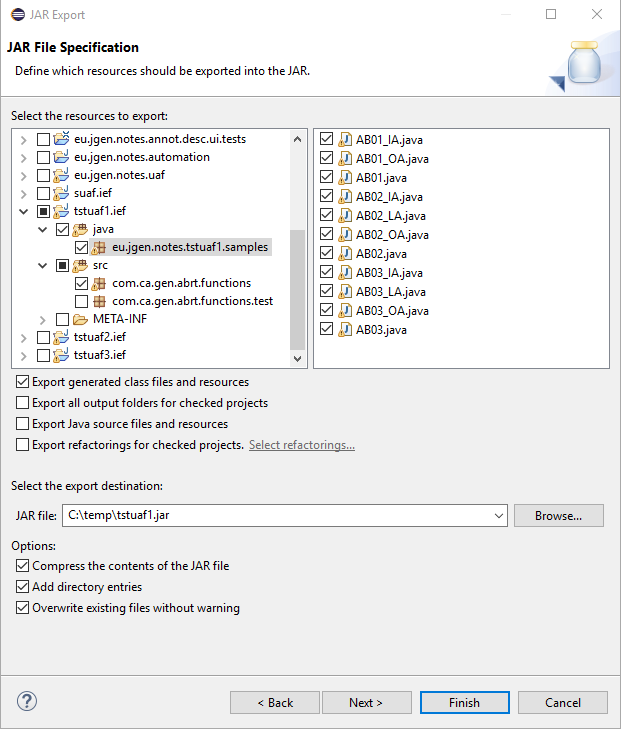
You need to make your jar visible to the Build Tool so application consuming your function can successfully compile your application. You jar file needs also to be included in the application ear file by the Assembly process.

You can see the sample application running after deploying to the Weblogic server.

Java Wrapping for CA Gen Encyclopedia API

Historically first officially published CA Gen API was the Encyclopedia and Workstation Application Program Interface (API) software for CA Gen. It supports the Host Encyclopedia and the Client Server Encyclopedia (CSE) for all available API platforms and databases. It also supports local access to workstation models, Host Encyclopedia, and the CSE for all available API platforms and databases.

The Encyclopedia API is a set of C functions, include files, and libraries. You must be familiar with the C programming language and the software development tools for the platform on which you are working in order to use the Encyclopedia API. You must also be familiar with the CA Gen meta-model.

Today we have CA Gen JMMI API written in Java. The JMMI was introduced when CA Technologies announced the CA Gen Studio built on the Eclipse platform. The JMMI is frontend written in Java, but most of their methods are native methods written in C++. The JMMI does not offer access to the models stored in one of the supported encyclopedias (HE and CSE). Therefore, the Encyclopedia API is the only way to access models stored in the HE and CSE.

The JGen Notes Core Java project is offering Java wrapping for the models located on the workstation only (limitations of the CA Gen Free Gen), but those interfaces can be easily extending to the model located in the remote places like Client Server Encyclopedia (CSE) or Host Encylopedia (HE).

You can find sources of the implementation here and here.


Developing plug-ins in Java for Gen Toolset

Overview

CA Gen allows applications to access the currently opened model through a mechanism that is known as a plug-in. The application should register itself in the Windows registry, and from there the CA Gen toolset knows how to call it. Toolset adds a menu item to the CA Gen “Plug-in” menu. The developer starts plugin from the toolset after Toolset opens model for processing.

You will find more information about CA Gen Toolset Automation here.

However, there is a problem when you are willing to develop something in Java language. The problem is because the plug-in application should instantiate a pointer to the currently opened toolset using the toolset OLE automation interface. Such interface allows the application to access the functionality provided by the interface. Unfortunately,  Java program cannot do it without using some software bridging those two different technologies.

Fortunately, Eclipse is using the SWT GUI framework. SWT does allow to integrated Microsoft application via OLE (Object Linking and Embedding). You can locate jar file org.eclipse.swt.win32.win32.x86_3.3.0.v3346.jar in the subdirectory of your Eclipse installation. Subdirectory name is  plugin.

It has the SWT Win32 OLE implementation classes. Classes provide the public API to the Microsoft Win32 Object Linking and Embedding mechanism that the win32 variant of SWT is capable of using. Referencing any of the classes in this package directly guarantees that the code is platform specific.

You can consult tutorial “Microsoft and Java Integration with Eclipse” written by Lars Vogel here. It helps understand the SWT Win32 OLE implementation classes and shows examples of the use.

Idea developing plugs using Java resulted in the need for some easier ways to access the Gen model and hide the complexity of the SWT Win32 OLE implementation classes. The Toolset Automation Wrapper is a package of Java classes doing just that. The Toolset Automation Wrapper does not cover all functionality offered by the Toolset Automation.

You can download Java documentation and jar file with the wrapper classes here.

You can find Eclipse project on GitHub here.

Sample Application

Sample application connects to the currently opened model in the CA Gen Toolset and lists all business systems defined in the model. The application is a simple Java class with the method main().  You need to run the application from the command line. Yon need be sure that you have two jar files on the classpath. They are jmmi and ToolsetAutomationWrapper.

Here is the source of the application:

package eu.jgen.notes.automation.example;

import com.ca.gen.jmmi.schema.ObjTypeCode;
import com.ca.gen.jmmi.schema.ObjTypeHelper;
import com.ca.gen.jmmi.schema.PrpTypeCode;
import com.ca.gen.jmmi.schema.PrpTypeHelper;

import eu.jgen.notes.automation.wrapper.JGenEncyclopedia;
import eu.jgen.notes.automation.wrapper.JGenFactory;
import eu.jgen.notes.automation.wrapper.JGenModel;
import eu.jgen.notes.automation.wrapper.JGenObject;

public class ListAllBusinessSystems {

	public static void main(String[] args) {
		// create instance of the factory class
		JGenFactory factory = JGenFactory.eINSTANCE;

		// create instance of the encyclopedia
		JGenEncyclopedia ency = factory.createEncyclopedia();

		// connect to the encyclopedia (model needs to be opened in the toolset
		// already)
		ency.connect();

		// select model for processing
		JGenModel genModel = ency.findModels()[0];
		System.out.println(genModel.getName());

		// find all business system in the model
		JGenObject[] bussyss = genModel.findTypeObjects(ObjTypeHelper.getCode(ObjTypeCode.BUSSYS));
		for (JGenObject bussys : bussyss) {
			System.out.println(bussys.findTextProperty(PrpTypeHelper.getCode(PrpTypeCode.NAME)));
		}
	}

}


The application will print the following messages on the console for the sample.ief model which is coming with the standard CA Gen installation on the workstation.

GEN SAMPLE MODEL 8 6
CORPORATE_MANAGEMENT
GUI_CORPORATE_MANAGEMENT
COOP_CORPORATE_MANAGEMENT

Summary

Solution and sample application have been developed using the following software:

  • Windows 10
  • CA Gen 8.6 (Free)
  • Java Version 8 (Update 20)
  • Eclipse Neon.3 Release (4.6.3)

This website uses cookies. By continuing to use this site, you accept our use of cookies.