Progress Update: Development of Meta-Meta Model Walking Utility with Advanced Filtering

A configurable meta-meta walking and filtering utility is under active development as an extension to the BeeAIGenModelWalker project. The objective is to enable users to extract a clean, business-focused view of the meta-meta model by filtering out technical, internal, and non-relevant elements according to configurable preferences.

Achievements

  • Robust Foundation: The existing model walker provides a solid and scalable base for traversing complex CA Gen / Bee Gen structures.
  • Advanced Filtering Layer: A flexible, configuration-driven filtering engine has been designed and prototyped. Filters are defined externally (JSON), allowing users to specify object types, property inclusion/exclusion rules, and business relevance criteria without modifying source code.
  • Clear Separation of Concerns: Instance-level (meta-model) walking has been kept distinct from schema-level (meta-meta) filtering, improving maintainability and performance.
  • Human-Readable Output: Reliable generation of structured Markdown reports has been implemented, with successful conversion to single-file HTML documents featuring professional formatting, tables, and collapsible sections for improved readability.
  • Significant Noise Reduction: Early application of filters substantially reduces output volume while preserving core business objects, properties, and relationships.

Challenges Encountered

  • Meta-Meta Complexity: Navigation of associations, property inheritance, and dynamic typing in the meta-meta layer has proven more intricate than instance traversal, requiring additional refinement.
  • Configuration Calibration: Achieving an optimal balance in filtering rules remains an iterative process. Over-filtering can omit relevant elements, while under-filtering retains excessive technical detail.
  • Metadata Quality: Many meta-meta definitions contain limited or missing descriptions, which impacts the richness of automatically generated documentation. Mitigation strategies, including fallback mechanisms and annotation support, have been introduced.
  • Visualization: Automated generation of diagrams from the filtered model (e.g., Mermaid or PlantUML) is still in the planning stage.

Current Status and Next Steps

The core MetaMetaBusinessFilter and reporting modules are now functional in a development branch. Users can load meta-meta structures, apply custom filters, and produce focused business-oriented documentation in Markdown or self-contained HTML format.Planned short-term enhancements include:

  • Improved command-line and configuration interface for easier customization.
  • Enhanced relationship cardinality handling and description enrichment.
  • Integration of diagram generation capabilities.
  • Full documentation and merge into the main repository.

This extension aims to transform the BeeAIGenModelWalker into a professional analysis and documentation tool suitable for architects, business analysts, and development teams working with CA Gen / Bee Gen models.

Project repository: https://github.com/JGen-Notes/BeeAIGenModelWalker

Feedback from the community on requirements, configuration examples, or additional use cases would be highly valuable.

publ@jgen.eu

Changing images in the CA Gen generated web application during runtime

Introduction

Users converting their existing CA Gen Windows GUI clients to the new Web Generation features as provided with the CA Gen are facing many unsupported or having partial support for many features that they are free to use in the GUI Windows environment. This is because of a lot of functionality is provided using third party solutions based on the OLE technology that is not supported by many browsers.

Building a simple web application allows displaying different images on the page depending on the current transaction context becomes a challenge and requires using external logic. The CA Gen provides two web page design features allowing provide external logic. They are HTMLText and HTMLControl.

This post provides tips how to implement external logic using JavaScript and external frameworks. A simple application will be used as an example explaining how step by step achieves the desired result.

Example application

Web example application is very simple.

Zrzut ekranu 2017-04-24 o 09.53.16

There is a drop down list box with a list of names. Picture of the person is displayed whenever a new name is selected.

Design

Design requires the creation of a single window with the mode set to HTML. Windows has two controls. One is drop-down list box and picture control.

Zrzut ekranu 2017-04-24 o 11.04.18

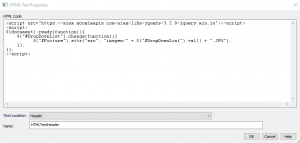
External logic will be provided by the HTML Text located in the page header.

Zrzut ekranu 2017-04-24 o 11.05.25

HTMLTextHeader is not visible on the page and will be executed once by the browser when a page is loaded.

Zrzut ekranu 2017-04-24 o 11.06.13

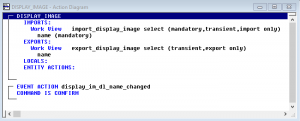
Action block implementing procedure step displaying window does not have any logic of its own.

Zrzut ekranu 2017-04-24 o 11.07.35

It has one statement and it is just to prevent error messages. Developers will provide a number of statements in normal circumstances.

Package, Generate, Build and Deploy

The application is ready to be generated once packaging of the application is completed. Build Tool will compile all required code and Assembly function will produce ear file with all what is required to run after deployment to the target application server. URL address to invoke the application from the browser will be something like below:

http://youraddress:7001/dynimg/disimage.jsp

The sample application has been developed using the following software:

  • Windows 10
  • CA Gen 8.6 (Free)
  • Java Version 8 (Update 20)
  • JQuery 3.2.0
  • Weblogic Server Version 12.2.1.2.0

External logic explained

Writing handwritten JavaScript scripts is the main way to deliver external logic to the web pages generated from the CA Gen model when existing version of the software does not offer a suitable solution. Additionally, we are going to use jQuery library. The purpose of jQuery is to make much easier to use JavaScript when developing web pages and the jQuery is easy to learn.

Let us look first on HTML page that has been generated from the CA Gen model. The file name of the page is DISPLAY_IMAGE.html.

Code for drop-down list box look as follows:

<SELECT CLASS='DFGUICMG DropDownList' NAME='DropDownList' ID='DropDownList'
 style="dir:ltr; position:absolute; left:56; top:18; width:316; " >
 <OPTION VALUE=' ' ></OPTION>
 <OPTION VALUE='Kowalski' >Kowalski</OPTION>
 <OPTION VALUE='Skipper' >Skipper</OPTION>
 <OPTION VALUE='Private' >Private</OPTION>
 <OPTION VALUE='Rico' >Rico</OPTION>
 </SELECT>

Code for picture control looks as follows:

<IMG NAME='Picture' ID='Picture' CLASS='DFGUILIT Picture' TABINDEX=0 style=" position:absolute; left:56; top:88; width:315; height:322; "
 SRC='images/any.jpg' BORDER=0 WIDTH=315 HEIGHT=322 ALT='ANY' TITLE='ANY' >

Picture control generated above has SRC parameter set once during generation and cannot be changed inside action block. This is why we need a JavaScript to do it for us.
Part of the header section of the HTML page you will see included the following code:

<!-- HTMLTextHeader -->
 <script src="https://ajax.googleapis.com/ajax/libs/jquery/3.2.0/jquery.min.js"></script>
 <script>
 $(document).ready(function(){
 $("#DropDownList").change(function(){
 $("#Picture").attr("src", "images/" + $("#DropDownList").val() + ".JPG");
 });
 });

You will notice that CA Gen generator included contents of the HTML Text control into the header section of the generated HTML. First <script> statement refers to the website with the jQuery library. The second <script> statement defines a function that will execute each time another value from the drop-down list box is selected. It listens to the change event and executes statement changing SRC parameter in the picture control. This action causes refresh and a new picture from another file is displayed in the browser.

This solution pickups images from the images subdirectory which is uploaded during deployment stage. It is important to remember to place all required images before deployment in the correct subdirectory of the model.

You can learn more about jQuery and how it works here.

Possibile modifications

This blog provides very simple example just to explain the main mechanism used creating external logic. More complicated modifications can be introduced using a similar approach. It could be more sophisticated image controls including video or images are stored in the database rather that in the file system and extracted dynamically when required. This will require to develop and implement external logic in Java using the CA Gen External Action Blocks mechanism. This can be a topic for another blog.

Links

Here you will find sample CA Gen model with the example used in this blog. Need to generate code, build web client application, assembly and deploy into one of the supported web servers.

This website uses cookies. By continuing to use this site, you accept our use of cookies.