Table of Contents
Overview
BeeAI CA Gen Model Toolbox is a collection of utilities and applications allowing you to migrate your application’s design metadata from the CA Gen Local Model to the more open-source implementation. Extracted meta-data is stored in the relational database in the local file system os …… The Bee Gen Model Toolbox is written mainly in Java and uses Eclipse IDE to develop many of its components. Java implementation of the toolbox makes it possible to port tools to different operating platforms supporting Java.
There are plans to use Swift to develop some components since Swift is an open and fast-growing programming language now.
Broadcom Inc. owns the CA Gen. Many governments and corporations use the CA Gen product to develop and run critical applications on various operating platforms using different architectures and different programming languages. CA Gen is a very complex set of tools allowing design application and generates faultless implementation code. You can learn more about what the product can do here.
A free version of the CA Gen Toolbox is available for download here so you can experiment with the toolset, developing tools and applications. The software you can download from Broadcom has several certain limitations. Please visit the website of Broadcom to learn more about conditions and limitations.
In brief, a CA Gen developer uses the CA Gen Toolset to create an application model. It results in creating a considerable number of meta-objects, capturing meta-associations between them, and recording their meta-properties. You are not concerned about specific implementation language code at design time. Specific language code and other deliverables are the results of the generation process after the design is complete.
CA Gen meta-data collected during design is proprietary, and its format does not follow any particular standards. CA Gen offers many Application Programming Interfaces (API), allowing access metadata from the so-called local model created by the CA Gen Toolset. One is Java-based (JMMI), but this particular API uses a 32-bit native code to communicate Windows-based toolset runtimes. It prevents porting any application using such API to any other platform than Windows.
The primary purpose of the Bee Gen Model is to migrate metadata from the CA Gen to a more portable environment. Open, and suitable for the development of research tools, and generating code for the platforms not yet supported by the CA Gen. The Bee Gen Model does not offer the possibility to add a new design to such migrated models. It is instead an environment you can merge different components from other tools with what you can develop using pure the CA Gen Toolset.
The Open Swift project has triggered raising interest in this new programming language Swift and its ability to run on various operating systems like macOS, Linux, and possibly Windows. For those reasons, Bee Gen Model Toolbox offers a dedicated API for Swift. It allows developers to build more tools using Swift as a programming language rather than Java. Another opportunity is to develop a Swift code generator to implement the server logic reusing the CA Gen server part of the application design.
The primary initial release of the Bee Gen Model Tollbox offers the following tools and utilities:
- BeeGenModelAPI for Java and Swift. APIs give access to the model and all its components.
- BeeGenUtilities for Windows. There are two command-based utilities allowing extract metadata from the CA Gen Local Model.
- BeeGenModelWalker. This is a research tool allowing navigate thru the contents of the model.
- BeeGenLanguageExtrator. This is a utility to generate Bee Language source code using information from the Bee Gen Model (still in the early development stage).
Documentation and source code is available for the public view on the GitHub:
- BeeAIGenModelAPI for Java
- BeeAIGenModelAPI for Swift
- BeeAIGenUtilities for Window
- BeeAIGenModelWalker
- BeeAIGenLanguageExtrator
You will get more details about technical requirements and how to use utilities by reading README files attached to the relevant repositories.
BeeAI Gen Model API
The Bee Gen Model API (for Java and Swift) is very simple and straightforward. It has very few classes allowing access and examines the contents of the model. You will notice that the API does not include any methods allowing change imported model. (…) You still need to download and use a free copy of the CA Gen software to create and develop your application. Such a model can then be extracted from the CA Gen Local Model and imported to the BeeAI Gen Model using the dedicated utilities. There are two versions of API, one for Java and one for Swift. Both are very similar and share the same ideas and a brief summary of the API follows.
You can download the API for Java documentation from here. Documentation for Swift will come later.
JGenContainer
This object represents a container. Bee Gen Model Framework uses the SQLite database to store metadata describing your application design as imported from the CA Gen Local Model. The container connects to the specific location of the SQLite database and facilitates access to the model. Therefore container represents the SQLite database as its specific physical implementation.
JGenContainer – Summary of API methods
| getModel() | Returns object representing the model stored in the container if the container is connected to the SQLite database and contains a valid model. |
| connect() | Connects to the SQLite database storing metadata with the application design. |
| disconnect() | Disconnects from the SQLite database. All actions on the model or any part of the model will reject any API’s functionality. |
| getContainerLocation() | Returns path to the location of the SQLite database as used during connect operation. |
JGenModel
This object represents a model stored in the container. A container connects to the SQLite database for accessing model data.
Getting a model from the container is a starting point for navigation through the model discovering your application’s design. It allows you to obtain access to objects of a specific type or/and specific name. Having such an object extracted, you can further discover how they associate with other objects and what properties they have.
The class contractor creates an instance of the model object and associates the model object with the container. Container knows how to access the SQLite database to retrieve information about objects and their associations and properties.
JGenModel – Summary of API methods
| getName() | Returns name of the model as given during model creation of the model in the CA Gen. |
| getVersion() | Gets the version of the utility creating the Bee Gen Model. |
| getSchema() | Gets the schema level of the CA Gen Model used as a source of metadata. |
| countObjects() | The method counts and returns the number of objects in the model. |
| countTypeObjects() | The method counts and returns the number of objects of the specified type in the model. |
| findNamedObjects() | The method finds and returns a list of objects having the specified object type, property type, and name. |
| findObjectById() | The method finds the object in the model having the specified object id. |
| findAllObjects() | The method finds and returns a list of all objects in the model. |
| getContainer() | The method returns the container owning this model. |
| findTypeObjects() | The method finds all objects with the matching object type code. |
JGenObject
An object represents a single element of the model that can own many objects of many different types. Each object may have a number of its properties and associations with other objects. You can follow associations discovering many other objects. The model functionality allows you to select several objects of your interest, and they can be a starting point to the navigation thru the model.
JGenObject – Summary of API methods
| findCharacterProperty() | The method finds a character property of the specified type for this object. It returns if the object does not have the property of the specified type or value existing property is not character type. |
| findTextProperty() | The method finds a text property of the specified type for this object. It returns an empty string if the object, for some reason, does not have the property of the specified type or value existing property is not character type. |
| findNumberProperty() | The method finds a number property of the specified type for this object. It returns in the object’s case that does not have of the specified type or value existing property is not character type. |
| findAssociationMany() | Finds and returns the collection of associated objects with itself. You specify as a parameter what type of associations to return. Returns empty collection if no matching associations are found. |
| findAssociationOne() | Finds and returns a single associated object with itself. You specify as a parameter what type of association to return. Returns null if such association does not exist. |
Metadata
Even the average CA Gen model is a rather massive collection of objects, associations between them, and object properties. Objects represent many different things, and associations can have different reasons why two objects are associated. More, each object can have many properties that are relevant when generating runtime ready applications. The CA Gen maintains some sort of repository of metadata describing what is stored in the models. You will find more about how it is done here.
The BeeAI Gen is a reflection of what is in the CA gen Local Model, and to be entirely usable, developers need to have access to such information. The BeeAI Gen Model Framework provides a similar mechanism helping navigate thru the model. The main advantage is using short, more meaningful mnemonic names instead of numeric type codes.
Metadata Helpers – Summary of enumerations and classes
| ObjMetaType | Enumeration of all object types. |
| AscMetaType | Enumeration of all association types. |
| PrpMetaType | Enumeration of all property types. |
| MetaHelper | Utility allowing discovers details about an object, association, and property types. |
Example of BeeAI API Usage in Java and Swift
Here is an example of the Java program using the API.
package eu.jgen.beegen.model.api.example;

import eu.jgen.beegen.model.api.JGenContainer;
import eu.jgen.beegen.model.api.JGenModel;
import eu.jgen.beegen.model.api.JGenObject;
import eu.jgen.beegen.model.meta.ObjMetaType;
import eu.jgen.beegen.model.meta.PrpMetaType;

public class ListAllActionBlockNames {

	public static void main(String[] args) {
		JGenContainer genContainer = new JGenContainer();
		JGenModel genModel = genContainer.connect("/Users/Xxxxx/beegen01.ief/bee/BEEGEN01.db");
		System.out.println("List of action blocks in the model: " + genModel.getName() + ", Using schema level: "
				+ genModel.getSchema() + "\n");
		for (JGenObject genObject : genModel.findTypeObjects(ObjMetaType.ACBLKBSD)) {
			System.out.println("\tAction block name: " + genObject.findTextProperty(PrpMetaType.NAME) + ", having id: "
					+ genObject.objId);
		}
		genContainer.disconnect();
		System.out.println("\nCompleted.");
	}

}
It produces the following output:
List of action blocks in the model: BEEGEN01, Using schema level: 9.2.A6

	Action block name: PERSON_CREATE, having id: 22020096
	Action block name: PERSON_DELETE, having id: 22020097
	Action block name: PERSON_UPDATE, having id: 22020098
	Action block name: PERSON_READ, having id: 22020099
	Action block name: PERSON_LIST, having id: 22020100

Completed.
Similar logic in Swift delivering the same result is as follows:
func testSampleApplication() {
        let containerPath = "/Users/Xxxxx/beegen01.ief/bee/BEEGEN01.db"
        let genContainer = JGenContainer()
        let genModel = genContainer.connect(to: containerPath)
        print("List of action blocks in the model: " + genModel!.getName() + ", Using schema level: "
                + genModel!.getSchema() + "\n")
        for genObject in genModel!.findTypeObjects(haveType: ObjMetaType.ACBLKBSD) {
            print("\tAction block name: " + genObject.findTextProperty(haveType: PrpMetaType.NAME) + ", having id: \(genObject.id)"
            )
        }
        genContainer.disconnect();
        print("\nCompleted.");
    }
Bee Gen Utilities for Windows
There are two command-line utilities assisting developers in extracting information from the CA Gen Local Model. They are both 32-bit Java command-line programs running on Windows and using the CA Gen JMMI API to access local models.
Summary of utilities
| BeeGenExtractorJSON | This utility accesses CA Gen Local Model and extracts metadata from the model and exporting the entire model’s contents to two JSON text files. |
| BeeGenExtractorSQLite | This utility accesses the CA Gen Local Model and extracts its contents creating and populating an SQLite database. |
If you are using the wrong version of Java to run utilities in case you have the following exception message:
Exception in thread "main" java.lang.UnsatisfiedLinkError: C:\Program Files (x86)\CA\Gen86Free\Gen\genmodel_client.dll: Can't load IA 32-bit .dll on a AMD 64-bit platformSample use of BeeGenExtractorJSON
Bee Gen  Model Extractor, Version 0.5, Schema Level 9.2.A6
Extracts meta data from the CA Gen Model and creates two JSON files showing entire model contents.
USAGE:
	pathModel      -   Location of the directory containing CA Gen Local Model (directory ending with .ief)
Connecting to the CA Gen Model in the directory 'C:\Gen\Models\beegen01.ief'
Connected to the model BEEGEN01...
Extracting object and property definitions...
Extracting associations definitions...
Two transaction files have been created in the sub-folder 'bee' of your CA Gen model 'BEEGEN01' at location 'C:\Gen\Models\beegen01.ief'
Run Statistics:
	Number of exported object definitions is 1228
	Number of exported property definitions  is 4174
	Number of exported association definitions is 3722
Transactions extraction completed.
Sample JSON generated for the objects and properties
[
  {
    "id" : 22020096,
    "type" : 21,
    "mnemonic" : "ACBLKBSD",
    "properties" : [
      {
        "type" : 30,
        "format" : "INT",
        "mnemonic" : "CEID",
        "value" : "1049"
      },
      {
        "type" : 232,
        "format" : "SINT",
        "mnemonic" : "OPCODE",
        "value" : "21"
      },
      {
        "type" : 224,
        "format" : "NAME",
        "mnemonic" : "NAME",
        "value" : "PERSON_CREATE"
      },
      {
        "type" : 216,
        "format" : "INT",
        "mnemonic" : "MODDATE",
        "value" : "20200831"
      },
      {
        "type" : 219,
        "format" : "INT",
        "mnemonic" : "MODTIME",
        "value" : "19545839"
      },
Sample JSON generated for associations
[
  {
    "from" : 22020096,
    "card" : "1",
    "mnemonic" : "GRPBY",
    "type" : 88,
    "inverseType" : 381,
    "to" : 6291508,
    "seqno" : 0,
    "direction" : "F"
  },
  {
    "from" : 22020096,
    "card" : "M",
    "mnemonic" : "USESEXST",
    "type" : 611,
    "inverseType" : 659,
    "to" : 134217729,
    "seqno" : 0,
    "direction" : "F"
  },
  {
    "from" : 22020096,
    "card" : "M",
    "mnemonic" : "USESEXST",
    "type" : 611,
    "inverseType" : 659,
    "to" : 134217728,
    "seqno" : 1,
    "direction" : "F"
  },
The second utility requires SQLite to be installed before you can run it. It will create a database and populate with the data extracted from the CA Gen model.
Sample use of BeeGenExtractorSQLite
Bee Gen Model Creator, Version: 0.5,  Schema Level: 9.2.A6
Extracts meta data from the CA Gen Model and creates Bee Gen Model.
USAGE:
	pathModel      -   Location of the directory containing local CA Gen Model (directory name should end with .ief)

Connecting to the CA Gen Model in the directory 'C:\Gen\Models\beegen01.ief'
Connected to the model BEEGEN01...
Tables dropped...
Tables created...
Loading objects and properties...
Loading associations...
Loading meta data for objects...
Loading meta data for properties...
Loading meta data for associations...
Tables populated...
BeeGen Model 'BEEGEN01.db' has been created in the sub-folder 'bee' of your CA Gen model 'BEEGEN01' at location 'C:\Gen\Models\beegen01.ief'
Run Statistics:
	Number of exported objects is 1228
	Number of exported properties is 4174
	Number of exported associations is 3722
	Number of exported meta objects is 642
	Number of exported meta properties is 14433
	Number of exported meta associations is 9423
Model extraction completed.
Bee Gen Model Walker
This is a research utility allowing connect to the Bee Gen Model and navigate thru the model.
The CA Gen models are complicated and extensive. There are thousands of types of objects, properties, and associations. Even the medium size model can have hundreds of thousands or millions of objects. The Bee Gen Models inherit the entire complexity and size.
Skills on navigating the vast population of objects and understanding the complexity of the associations between them are essential before any attempt to reuse such information by, for example, developing reports or writing generators or any similar projects.
Walker is a tool helping in the process.
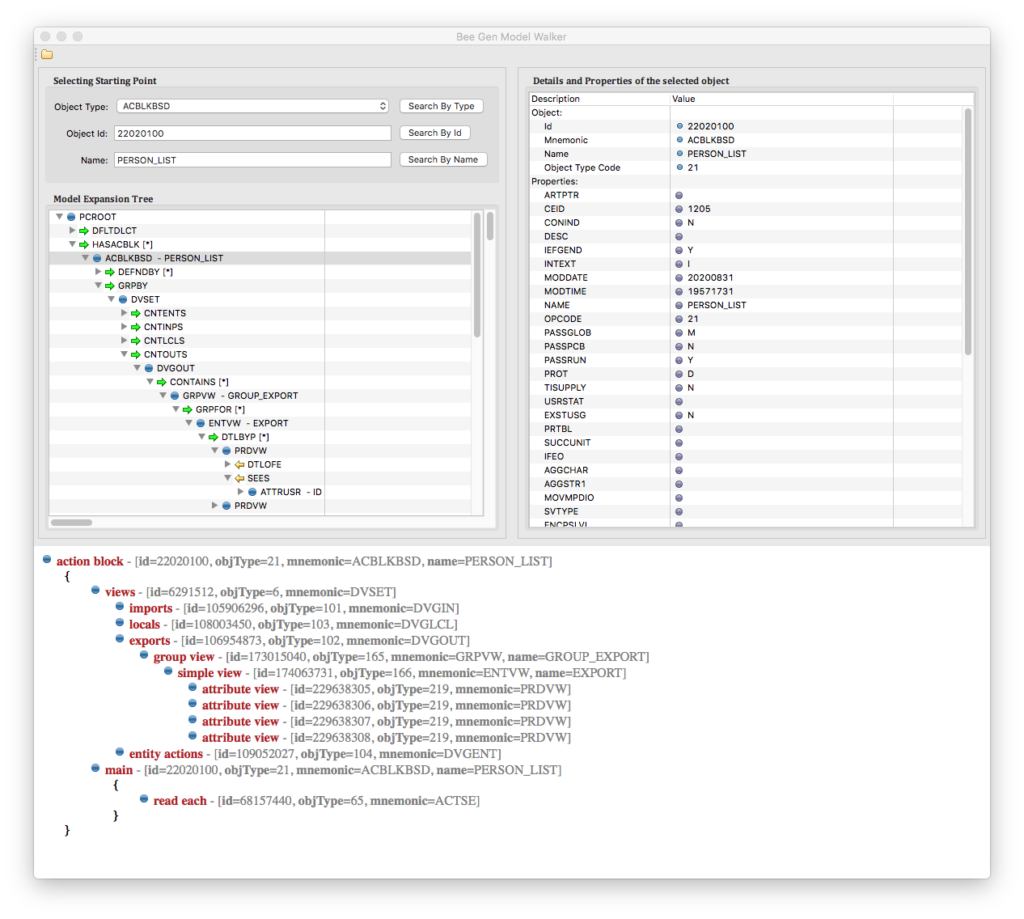
Here is a snapshot of the screen of the Walker showing how the Walker does work. This example of how the screen looks when you open a model and select object type or object id. You can see a hierarchical view of the fragment starting, in this case, from the PCROOT type of object. You can see that if you expand using forward association HAACBLK, it returns several action blocks already defined in the model. You can expand further by learning about the construction of the action block.
On the right side of the expansion tree, you can learn what properties have of any highlighted object.
On the pane below, you can see a special report showing the structure of the action block. This report maps objects to the action block’s statements whenever you select an action block object in the expansion tree. You see, below is the only report available at the current release, but more reports will be available in Walker’s next releases.
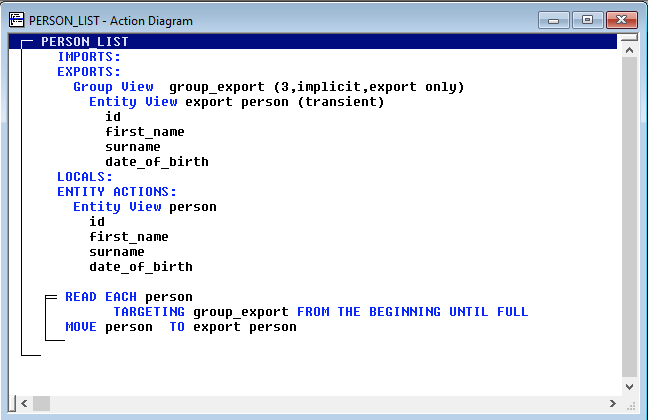
The below snapshot shows a fragment of the model, as seen in the CA Gen Toolset, when developing an action block using an action block diagraming tool.
Useful links
All components of the Bee Gen Model Framework are open source and you can view them on Github. Here are links to relevant repositories:
Also, you will find more detailed information about each of the components.